
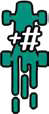
Take # Heat cards from the Engine and move them to your discard pile.
Note: If you accidentally played an Upgrade
card and you cannot pay the Heat cost of it, discard it and
play a random Speed card from your draw deck instead
by following the usual process as described in the Stress
section on page 5 of the Rule booklet.

Take # cards from the top of your draw deck and flip them into your discard pile.

During step 8 (Discard), remove the cards that show that Symbol from the game instead of discarding them.

If you cross a corner this turn, your Speed Limit is modified by # for you; “+” means you can move faster, “-” means you must move slower

Take up to # Heat cards from your hand and return them to the Engine spot.

You may look through your discard pile and remove up to # Heat cards from it. Return these cards to your Engine spot.
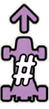
If you choose to Slipstream in step 6, your typical 2 Spaces may be increased by the indicated #.

It allows for an extra Slipstream move if the previous one puts your car in a new Slipstream position. All bonuses to a Slipstream available for the round will also apply to this extra move.
Move your car forward on the race track up to # Spaces. All Spaces you move into/through thanks to this symbol must be completely free of other cars and the final landing Space must have at least one car in either Spot of the Space in front of
it. This extra movement does not count as speed.
If you have access to several Draft symbols in the same round,
you can either use them separately or add up their values and
use them in a single Drafting action.
Drafting is not Slipstreaming. It can be used to cross the Finish
Line or after the Finish Line at the end of a race.

You may immediately discard up to # Stress cards from your hand to the discard pile.

You may place this card back on top of your draw deck at the end of the React step.

You may increase your Speed by 1 for every card flipped this turn (from Upgrades, Stress and Boost). If you do, you must increase it for all the flipped cards.

You may look through your discard pile and choose up to # cards there. These cards are shuffled into your draw deck.

You may play this card from your hand. If you do, it applies as if you played it normally, including Speed and mandatory/optional icons.

Speed limit is 1 higher.

Speed limit is 1 lower.

If your Speed is higher than the Speed Limit when you cross this corner, the cost in Heat that you need to pay is increased by one.

If you choose to Slipstream in step 6, you may add one extra Space to the usual 2 Spaces. Your car must be located in this sector before you slipstream

Do not pay Heat to boost in this sector (still max one boost per turn). Your car must be in the sector when you boost.

Weather effect applies to this sector. See the Weather token for the effect.

If you choose to Slipstream in step 6, you may add 2 extra Spaces to the usual 2 Spaces. Your car must be located in this sector before you slipstream

You cannot start slipstreaming from this sector (you may slipstream into it).

+1 Cooldown in this sector during the React step.
No Cooldown allowed in this sector during the React step.

Shuffle 1 extra Stress card into your deck.

Remove 1 Stress card from you r deck.

Place 1 extra Heat card in your Engine.

Remove 1 Heat card from your Engine.

Shuffle 1 extra Stress card into your deck.

Place 3 of your Heat cards into your discard pile.